---
layout: post
title: "Lucecita: RubyCocoa example"
date: 2008-07-25
comments: false
status: obsolete
reviewed: 2026-10
status_note: >
RubyCocoa hasn't been maintained in more than a decade, and these zip links
died with Google Page Creator. The code is still on GitHub, but the app won't
run on a modern Mac.
categories:
- ruby
- Lucecita
- code
- RubyCocoa
---
UPDATE: Version 2.0 of Lucecita is out. Lucecita 2.0
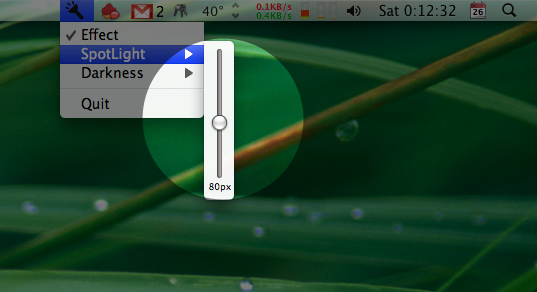
There are some applications like Mouseposé, OmniDazzle or RemoteBuddy that allow you to have a really nice light effect with your mouse. But as I have stated before, I am a poor student :) and since I am saving money to buy a new laptop (by the way, please support me with the ads and with donations!!) I have written a little app called "Lucecita". For the impatient: Lucecita.app.[^2026-lucecita-zip]
[^2026-lucecita-zip]: googlepages.com shut down and took this zip with it, and there's no archived copy. The code and the 2.0 DMG live at [github.com/juanger/lucecita](https://github.com/juanger/lucecita).
DarkWindow.rb
```ruby
require 'osx/cocoa'
include OSX
class DarkWindow < NSWindow
def initWithContentRect_styleMask_backing_defer(contentRect, aStyle, bufferingType, flag)
result = super_initWithContentRect_styleMask_backing_defer(NSScreen.mainScreen.frame,
NSBorderlessWindowMask,
bufferingType,
flag)
if result
result.setBackgroundColor(NSColor.clearColor)
result.setOpaque(false)
result.setIgnoresMouseEvents(true)
result.setLevel(NSScreenSaverWindowLevel)
result.setCollectionBehavior(NSWindowCollectionBehaviorCanJoinAllSpaces)
end
result
end
end
```
LightView.rb
```ruby
require 'osx/cocoa'
include OSX
class LuzView < OSX::NSView
attr_accessor :center, :rect, :radius, :transparency, :enabled
def initialize
@radius = 50
@transparency = 0.5
@enabled = false
end
def initWithFrame(frame)
self.setNeedsDisplay true
return self
end
def drawRect(rect)
if @enabled
NSGraphicsContext.currentContext.setCompositingOperation NSCompositeSourceOut
context = NSGraphicsContext.currentContext.graphicsPort
@center = NSEvent.mouseLocation
CGContextSetRGBFillColor(context, 0.0, 0.0, 0.0, @transparency)
CGContextFillRect(context, rect)
drawLight
end
end
def drawLight
context = NSGraphicsContext.currentContext.graphicsPort
NSColor.colorWithCalibratedRed_green_blue_alpha(1.0,1.0,1.0,0.0).set
CGContextSetGrayStrokeColor(context, 0, 1)
CGContextSetLineWidth(context, 0)
@rect = NSRect.new(@center.x - @radius, @center.y - @radius, @radius*2, @radius*2)
CGContextAddEllipseInRect(context, @rect)
CGContextDrawPath(context, KCGPathFill)
end
end
```
LightController.rb
```ruby
require 'osx/cocoa'
class LuzController < OSX::NSObject
ib_outlets :luz_view
ib_outlets :menu, :size, :size_lbl, :alpha, :alpha_lbl, :enabled
def awakeFromNib
activateStatusMenu()
@callback = lambda { |p,t,e,r|
if (t == KCGEventOtherMouseDown &&
CGEventGetFlags(e) & KCGEventFlagMaskControl == KCGEventFlagMaskControl)
toggle(self)
return
end
if @luz_view.enabled
@luz_view.center = CGEventGetLocation(e)
@luz_view.setNeedsDisplayInRect NSInsetRect(@luz_view.rect, -30, -30)
end
e
}
start_tapping()
end
ib_action :change_alpha do |sender|
@luz_view.transparency = @alpha.floatValue
@alpha_lbl.setStringValue "#{(@alpha.floatValue*100).to_i}%"
@luz_view.setNeedsDisplay true
end
ib_action :change_size do |sender|
@luz_view.radius = @size.floatValue
@size_lbl.setStringValue "#{(@size.intValue)}px"
@luz_view.setNeedsDisplay true
end
ib_action :toggle do |sender|
@luz_view.enabled = !@luz_view.enabled
@enabled.setState(@luz_view.enabled ? 1 : 0)
@luz_view.setNeedsDisplay true
end
def activateStatusMenu()
statusItem = NSStatusBar.systemStatusBar.statusItemWithLength(NSVariableStatusItemLength)
statusItem.retain
icon = NSImage.alloc.initWithContentsOfFile("#{NSBundle.mainBundle.resourcePath}/Lucecita.png")
statusItem.setImage icon
statusItem.setHighlightMode true
statusItem.setMenu @menu
end
def start_tapping
eventMask = 167772384 # Magic Number: LeftMouseDragged MouseMoved RightMouseDragged OtherMouseDragged OtherMouseDown
eventTap = CGEventTapCreate(KCGSessionEventTap, KCGHeadInsertEventTap,
0, eventMask, @callback, nil)
eventSrc = CFMachPortCreateRunLoopSource(nil, eventTap, 0)
CFRelease(eventTap)
CFRunLoopAddSource(CFRunLoopGetCurrent(), eventSrc, KCFRunLoopCommonModes)
CFRelease(eventSrc)
end
def applicationShouldTerminate
CFRunLoopRemoveSource(CFRunLoopGetCurrent(), mEventSrc, KCFRunLoopCommonModes)
end
end
```
And the application is here: Lucecita.app
You can activate it with the menu or with ctrl-Button3Click or ctrl-Button4Click if you have a three button mouse or a Mighty Mouse.[^2026-tap]
[^2026-tap]: A global event tap like the one in LightController now needs the Accessibility permission in System Settings, and without it the app would fail without saying anything. A Swift port is maybe 80 lines, a nice afternoon exercise (or a job for an agent).
I am preparing a screencast to show you how I coded it but that will be later,[^2026m-screencast] until then you can see inside the app package and check the ruby code.
[^2026m-screencast]: Spoiler, that screencast never happened. See Lucecita 2.0 and the screencast post.